|
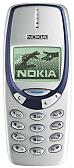
The new Nokia 3330 sports a wide range of enhanced features perfect for the mobile lifestyles of today. You can surf the mobile Internet with the WAP browser, personalize the phone with cool animated screensavers, use chat messaging for fast conversation with friends and take part in all kinds of fun activities.
Get it now with WAP
With the built-in WAP browser of the Nokia 3330, you can get almost anything you want - you just have to know where to find it. And thanks to the built-in WAP browser, finding what you want is easy. Want to buy some cinema tickets? Order a pizza? Or maybe you want to check out the city guide to find out what's happening in town? No problem! With the Nokia 3330, mobile life is a sure thing!
Get animated with animated screensavers
Watch the Nokia 3330 come to life with animated screen savers. When the phone is not in use, an animated screen saver can be set to appear on the display, so you can give your phone a little more personality. How about a pair of blinking eyes? Or maybe a pixel-snake that crawls around the screen! The choice is yours.
Get the message with chat messaging
Have more fun with text messages on the Nokia 3330. The new chat messaging feature lets you talk using messages with your friends and family, while keeping track of the whole conversation. And if you have a little bit more to say, the Nokia 3330 makes it easy by automatically connecting up to three text messages - giving you plenty of space to get the message across.
Get the vibe with the vibra feature
Did you ever get the feeling you're about to get a phone call? With the Nokia 3330, you'll know for sure with the built-in vibra feature. You can set the phone to vibrate before ringing when you receive a call - which is handy if you don't want your 'Birdie Song' ringing tone going off all the time! The vibra feature also makes games electrifying - the phone vibrates whenever you get blasted by aliens in Space Impact or tilt the pinball machine in Bumper!
Get it all
A pinball machine isn't the only thing that has been squeezed into the Nokia 3330. For example there's voice dialing - just say the name and the Nokia 3330 will dial the number. You'll also find predictive text input, built-in smiley templates, a reminder function, and a WAP picture viewer that lets you scroll around images and select parts to use as graphics for the phone. With all these features packed into a stylishly hip design, you'll be pleasantly surprised by the Nokia 3330. That's a sure thing!
Technical Specifications:
Size
- Weight: 133 g (standard battery)
- Dimensions: 113x48x22mm, 97cc
Display
- High contrast full graphics display. Dynamic display layout which adjusts automatically for the best viewing
Phonebook
- 100 name internal phone book
- Up to 250 locations in SIM card (the actual number of memory locations in the SIM is SIM specific)
- Fetch service: Possible to use phone numbers from SIM memory when sending SMS, storing Message Centre number or Voice Mailbox number or activating Call Divert to 'other number'
Languages
- Automatic selection based on SIM card language (Phase 2 SIM)
- Available languages in phones depends are country depended (language pack)
Europe and Africa
- Menu text & predictive text input: Danish, Dutch, English, Finnish, French, German, Italian, Portuguese, Spanish, Swedish, Norwegian, Turkish, Czech, Polish, Hebrew, Hungarian and Slovak
- Menu text only: Bulgarian, Croatian, Czech, Romanian, Russian, Serbian, Slovak, Slovene, Estonian, Latvian, Turkish, Lithuanian, Hungarian, Polish, Greek, Hebrew, Arabic, Ukranian and Ukrainian
Asia / Pacific
- Menu text & predictive text input: English and Chinese
- Menu text only: Bahasa, Indonesia, Bahasa Malaysia, Tagalog and Vietnamese
Voice Dialing
- Voice Dial for up to 8 names
- Activate by long press on 'Menu' key or by long pressing of headset button.
Ringing Tones
- Vibrate then ring option
- 35 fixed and 7 own tones (for composed tone or downloaded tone)
Call management
- One key calling: locations 1 to 9 (1 is always voice mail)
- Last number redial from dialed calls list (scroll-up brings out the dialed calls list)
- Automatic redial (max 10 attempts)
- Automatic answer (works with headset or car kit only)
- Emergency calls to 112 without SIM-card and with key locked phone
- Various speed dialing methods
- Call waiting, call hold, conference call
- Automatic and manual network selection
- Closed User Group
- Fixed Dialing Number, allows calls only to predefined numbers
Phone Features
- WAP 1.1 Browser (via CSD) with 2.5kb deck size
- Customizable and downloadable profiles
- Screen saver is based on picture message format. Any received picture message can be displayed as screen saver. Timer for the screen saver can be set to 5sec.-10min.
- Animated screen savers
- Clock
- Currency converter from idle mode
- Stopwatch
- Countdown timer
- Alarm clock
- Calculator
- NITZ (Network Informed Time Zone)
- Reminders (10 notes)
- 5 Games
- Snake II
- Pairs II
- Space Impact
- Bantumi
- Bumper
- Games download (via WAP): Extra game packs can be downloaded using WAP
- High score sending to Club Nokia
- Picture Viewer: 4-way scrolling of bitmaps in WAP (if larger than display). Option to cut out section of bitmap or animation to use as graphic
Short Message Service
- Easy to call number in message
- Sent message delivery report
- Replace Message
- Cell Broadcast
- Predictive text input
- Multiple SMS sending: a quick and easy way to send the same message to several persons.
- Templates: quick and easy sending of pre-defined messages.
- Picture messages: allows a picture to be sent with text. 7 predefined and replaceable pictures in the phone plus 1 empty slot.
- Screen savers (5 predefined ones) are viewed in same list as picture messages and can be sent as picture messages
- Concatenated messages: allows writing messages almost 3 times as long as usual.
- Smilies for SMS - quick and easy insertion of editable smilies in SMS from smile templates.
- Mobile Chat: The Nokia 3330 supports Chat based on standard SMS. All previous written messages from both persons are visible on screen. Chat messages are not saved on SIM card.
Smart messaging
- Picture Message sending and receiving
- Name and number (business card) sending and receiving
- Reminder note sending and receiving
- Ringing tone receiving
- Operator logo receiving
- Profile receiving
- Remaining units/currency on pre-paid card
|
- GSM phones require the purchase of a SIM card for startup. This card is provided by your service provider or can be purchased from us if you will be traveling overseas.
If you will be taking the phone overseas you will need to purchase a Sim Card from your destination country or you will need to purchase a Country specific sim card from us before you leave. Please see below for more info.
- Instruction manuals for these phones may not be in English. These phones are manufactured in Europe so they might have European language manuals. You can usually download an English manual from the manufacturer's websites.
- NOTE: Our phones are unlocked so you can use them with any carrier. You may find this phone cheaper if it is locked but you will have to sign a service contract and will not be able to use the phone with any other carrier. This means that if you buy a phone from AT&T or VoiceStream, it will be locked and you will not be able to use it with a different service provider in Europe or any other country.
Looking for a GSM phone for use while traveling overseas?
For country Specific Sim Cards please click here
-
Country specific sim cards are available on our website so you can start using your phone the minute you get off the plane at your destination country. You can always purchase a SIM Card at the country which you are traveling to or moving to, however it may take a while to go to a shop. If you buy the SIM CARD before you go, you will not need to worry about doing that when you get there. Also our cards offer some of the best rates or domestic and international rates.
|